Point MeetingBaaS at object storage you own and every recording, transcript, audio chunk and log goes there instead. Two credentials, a real access check, and an honest account of what you give up.
"Where does the recording live?" is the question that stalls enterprise deals. For a bank, a hospital, or anyone operating under a data residency requirement, "in our buckets, encrypted" is not an answer they can take to their compliance team.
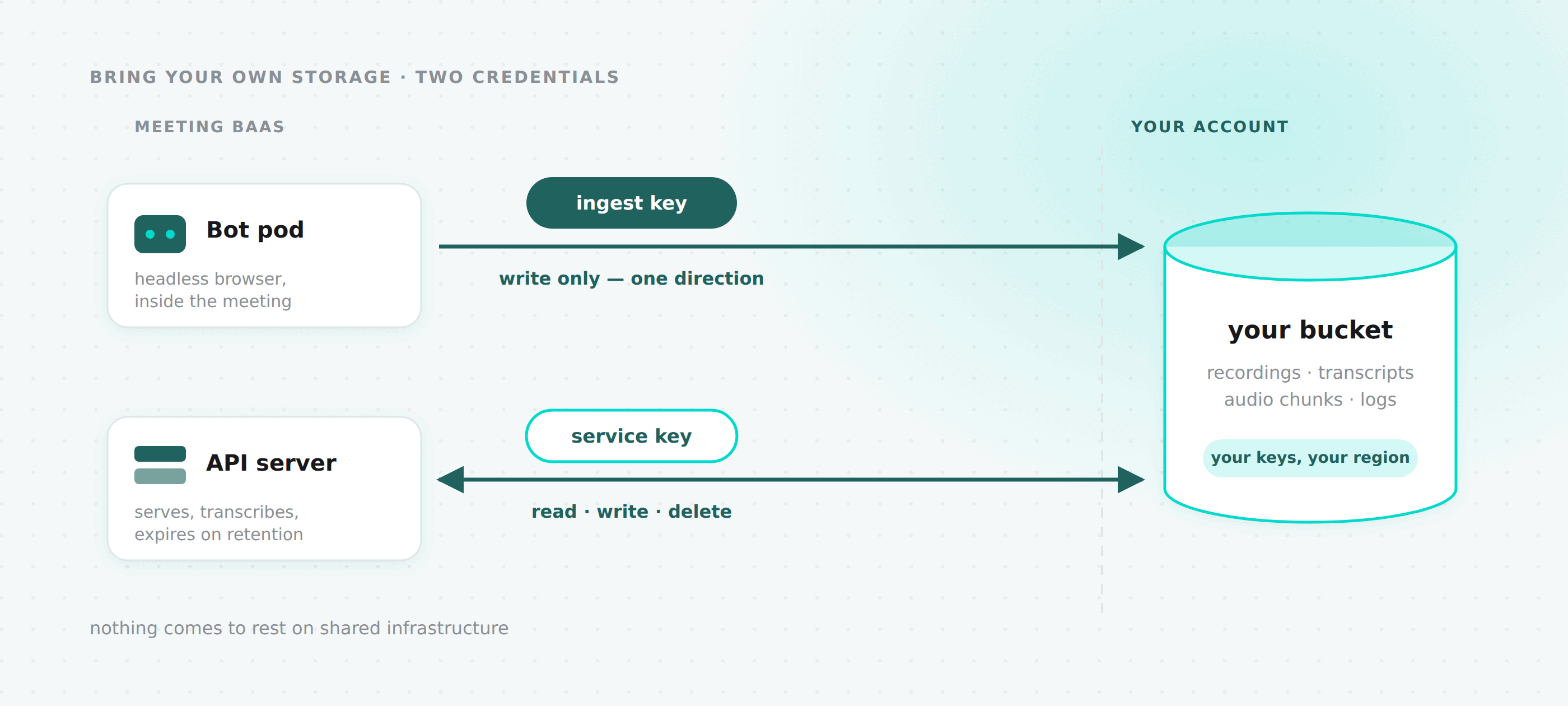
So now you can give us a bucket. Every artifact your bots produce from that point on, recordings, audio chunks, transcripts, screenshots and logs, is written to storage you own, with credentials you issued and can revoke.
GET    /v2/storage-config          your current configuration, 404 if unset
PUT    /v2/storage-config          set or replace it
POST   /v2/storage-config/test     re-run the access check
DELETE /v2/storage-config          back to MeetingBaaS storage
Or Settings → Storage in the dashboard, which is the same four handlers behind session auth.
Two credentials, split by where they physically end up
This is the design decision I would defend hardest, so let me start with it.
You supply two access key pairs, not one:
| Permissions | Where it lives | |
|---|---|---|
| ingest | PutObject, PutObjectTagging, AbortMultipartUpload | Handed to the recording bot. Leaves our network. |
| service | GetObject, ListBucket, PutObject, DeleteObject | Our API server only. Never leaves. |
The ingest key is the only credential that goes anywhere near your meeting. It rides onto a pod running a headless browser inside a call, which is the most exposed place any credential in this system could sit. It can write objects. It cannot read one back, cannot list what is there, and cannot delete anything. A compromised pod can add junk to a prefix and that is the whole extent of it.
The service key does everything else: serving your recordings back through signed URLs, writing transcripts when they arrive, and deleting artifacts when your retention window expires.
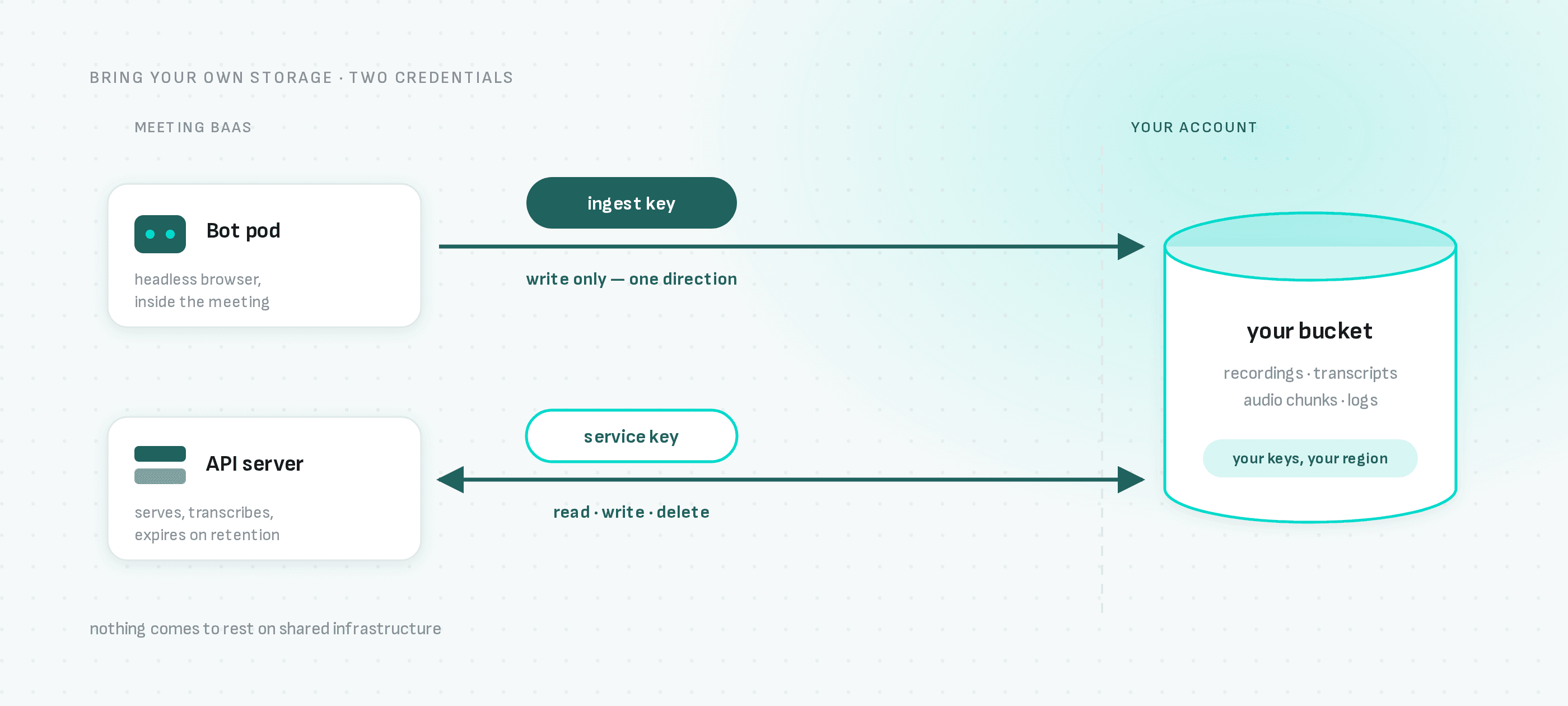
Worth being precise about something here. The service key is not read-only, and describing it that way would be a lie you would eventually catch us in. It writes and it deletes, because the API genuinely does both. What the split buys is that the credential in the risky location is the weak one. That is a real reduction in blast radius and not the same thing as least privilege everywhere, and I would rather tell you exactly which one you are getting.
Setting it up
{
  "endpoint": "https://s3.eu-west-3.amazonaws.com",
  "region": "eu-west-3",
  "force_path_style": false,
  "artifacts_bucket": "acme-meeting-artifacts",
  "audio_chunks_bucket": "acme-meeting-audio-chunks",
  "logs_bucket": "acme-meeting-logs",
  "allow_transient_spill": false,
  "ingest_access_key_id": "AKIAIOSFODNN7EXAMPLE",
  "ingest_secret_access_key": "...",
  "service_access_key_id": "AKIAI44QH8DHBEXAMPLE",
  "service_secret_access_key": "..."
}
The three bucket names can all be the same bucket. Object keys are prefixed with the bot id either way, so nothing collides. force_path_style is what MinIO, Ceph and most self-hosted gateways need; AWS and Scaleway work without it.
The endpoint has to be public HTTPS with no credentials or query string in it. Buckets should be private, since artifacts are served through short-lived signed URLs, but they do need to be reachable from the internet: transcription providers fetch audio directly from a signed URL rather than proxying through us.
Allow the dashboard's origin on the artifacts bucket while you are in there. The dashboard fetches artifacts and reads transcript JSON rather than linking straight to them, so those are cross-origin reads against your endpoint, and without a CORS rule the browser throws the response away before anything can render. GET and HEAD from your dashboard origin is the whole rule. Worth knowing that PutBucketCors sits a tier above the object permissions the service key holds, so it needs an owner-level credential — the service key returning Forbidden there is the scoping working, not a bug.
Reading the configuration back gives you both access key IDs, so you can tell which credentials are in use, and neither secret. Ever. Replacing a configuration means re-entering both secrets, because we cannot show you what is there.
The access check, and why it is not a formality
PUT verifies the configuration before it stores it. Not by calling ListBuckets and calling it a day.
The ingest key writes a marker object into each distinct bucket. Then the service key reads that object, writes it, and deletes it.
Each verb is exercised by the credential that will really perform it in production, so the probe fails the same way production would. All four are load-bearing: ingest upload is how recordings arrive, service upload is how transcripts get written, read is how artifacts get served, delete is how retention actually expires anything.
The genuinely useful part is splitting write from read. The marker is written by one credential and has to be found by the other. That catches the failure nobody tests for: two key pairs that are each perfectly valid, but pointed at different buckets or different accounts. Every single-credential health check in the world passes that configuration, and then you lose a recording.
Without this, the first sign of a typo'd bucket name is a failed upload at the end of a real meeting, after the pod's local disk is gone. When the check fails, we surface the provider's own message verbatim rather than a generic error, because "the ingest key cannot write to the artifacts bucket" is the entire value of running it.
You can re-run it any time with POST /v2/storage-config/test, which is what you want after rotating keys or changing a bucket policy.
One thing it deliberately cannot catch: CORS. The probe runs from our servers, where CORS does not apply, so a bucket can pass every verb above and still refuse to hand a recording to a browser. That gap is ours to close, and until we do, the note about allowing the dashboard origin is what stands between a green check and a dashboard that displays nothing.
The invariant everything else follows from
A bot always resolves to the storage it was written to, never to whatever its team is configured with today.
When a bot is dispatched, the storage configuration in force at that moment is stamped onto the bot record. Every read, every signed URL and every deletion for that bot resolves through the stamp. Not through the team.
That sounds like an implementation detail. It is the reason the feature is safe to turn on, and four consequences fall directly out of it:
Changing your configuration inserts a new row and disables the old one. It never updates in place. Mutating the row would silently redirect every existing bot's artifacts to a bucket where they do not exist.
DELETE /v2/storage-config only flips a flag. Nothing is deleted, on either side. A hard delete would strip the credentials that older bots still need and orphan every recording in your account.
Resolution deliberately ignores whether a config is enabled. Disabling stops new artifacts going to your bucket. It must not orphan the ones already there.
A stamped config that cannot be found raises an error rather than falling back to our buckets. Falling back would report your artifacts as missing, and on a retention deletion it would silently leave your data behind while reporting success. Loud failure is the correct behaviour.
The practical version: set it, change it, or remove it whenever you like. Older recordings keep working through all of it. The only thing that makes old artifacts unreadable is revoking our access on your side, which is your call to make and works exactly as you would expect.
The trade you are actually making
allow_transient_spill defaults to false for teams on their own storage, which is the opposite of our platform default. Here is what that means, in full, because it is the one place this feature costs you something.
Normally, when an upload fails, we mirror the artifact onto our own network volume and a reconciliation job pushes it later. That path copies the entire meeting: the video, the audio, the diarization output, every chunk. Onto our infrastructure, in our account.
Which is exactly what a residency customer signed up to avoid. Worse, residency customers hit that path more than platform customers, because their bucket is off our network and often at a different provider entirely.
So with allow_transient_spill: false, the fallback is switched off across every bot type and the consumer. An upload that exhausts its retries is reported as failed, and the artifact is lost.
That is the trade: durability for residency. We partially offset it by giving the bot's upload client six attempts instead of the SDK's default three, so a blip does not cost you a recording, but a sustained outage on your bucket still will.
Set it to true if you would rather keep the recording than hold the guarantee. The dashboard shows a warning explaining precisely what you are giving up when you flip it, because it should not be a checkbox you tick past.
If recordings go missing and your bucket had an outage, that is the first thing to check.
What this does not do
Four things, stated up front so nobody discovers them later.
Nothing already recorded gets moved. There is no migration. Every bot stays resolving to wherever it was written, which is what makes turning this on safe, and also means your history stays on our buckets.
No per-bucket prefix configuration. Keys are <bot_uuid>/… and that is fixed.
This does not make residency airtight on its own. Bot pods still hold the recording on local disk while the meeting is running. What it closes is the one path where your recording comes to rest on shared MeetingBaaS infrastructure.
Dashboard assets stay on our buckets. Logos, user avatars and support attachments are not meeting data and are not covered.
Rolling back
DELETE /v2/storage-config, safe at any time. New bots go back to our storage immediately. Existing bots keep resolving to your buckets and keep working.
Related
- Six Transcription Providers, One API — pair a bucket region with a provider region for end-to-end residency
- Self-hosting Meeting BaaS — if owning the bucket is not far enough
- Meeting BaaS API reference
If you are working through a residency requirement and want to know exactly which components touch what, ask us. We will give you the same answer we gave here.