Google Meet now sorts join requests into a verified queue and a high-risk one. Data-center bots land in the second. Here is how we sign bots into a real Workspace account using SAML, and how to set it up.
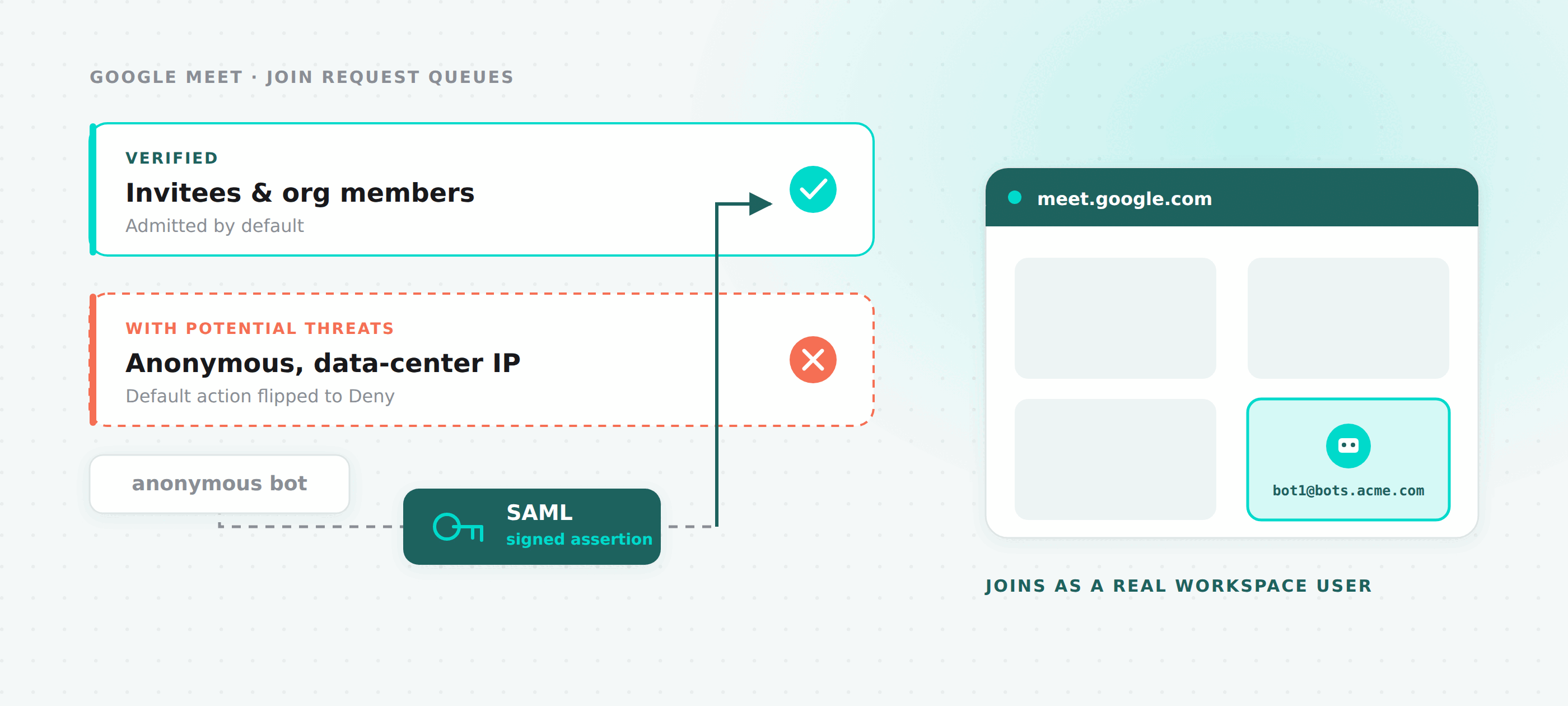
In April 2026 Google Meet started sorting join requests into two queues. Invitees and org members go into a verified queue and get waved through. Everyone else lands in a second queue that hosts see labelled "With potential threats", where the default button is Deny rather than Admit.
Recording bots run on data-center IPs. Every one of them lands in the second queue.
We tried the obvious fix first. Residential proxies do not work here: the pools are shared, so their reputation is already spent, and Google flags them the same way. The only thing that actually moves a bot into the verified queue is being a real Google Workspace user in a real organization.
So that is what we built. A bot can now sign into a Workspace account you own, and join as that user.
This is opt-in and per bot. Leave meet_config out of your request and nothing changes: your bots keep joining anonymously exactly as before.
The part that surprises people
Everyone assumes "authenticated bot" means OAuth, and that they will be handing us access to their Google account. That is not what happens.
The mechanism is SAML. Your Workspace is configured with a Legacy SSO profile that points at our sign-in endpoint. When the bot types its email into the Google login page, Google sees the domain is federated and redirects to us. We sign a SAML assertion with the private key matching the certificate you uploaded to your own Workspace, the browser POSTs it back to Google, and the bot is signed in.
You never grant MeetingBaaS access to any Google API. You upload a public certificate to a Workspace you control. We hold the matching private key and use it for exactly one thing.
The three approaches people expect all fall over:
| Approach | Why it fails |
|---|---|
| Username and password | 2FA prompts, password rotation, captchas, and "unusual location" challenges. A headless browser loses all of these. |
| Google OAuth (3LO) | Requires an interactive consent dialog per account. There is nobody there to click it. |
| Service accounts | Cannot join a Meet call as a participant at all. |
SAML sidesteps every one of those. There is no second factor to satisfy, because the assertion is the authentication.
Two resources, not one
The API splits into workspaces and logins, and the split is not arbitrary.
Google's Legacy SSO profile holds one verification certificate per Workspace, shared by every user in it. If we modelled the certificate per login, then adding a bot account would mean either generating a fresh keypair and overwriting the certificate in Google Admin, which instantly breaks every login already registered against the old one, or pasting the same certificate and key into every create call by hand.
So the certificate lives on the workspace, and identities hang off it.
/v2/meet-workspaces   → domain + SAML certificate and private key
/v2/meet-logins       → the Workspace users, attached via workspace_id
Workspaces
POST   /v2/meet-workspaces
GET    /v2/meet-workspaces
GET    /v2/meet-workspaces/:workspace_id
PATCH  /v2/meet-workspaces/:workspace_id
DELETE /v2/meet-workspaces/:workspace_id
Two ways to create one. Let us generate the keypair:
{
  "name": "Acme Production",
  "domain": "bots.acme.com",
  "generate_keypair": true
}
Or bring your own:
{
  "name": "Acme Production",
  "domain": "bots.acme.com",
  "cert_pem": "-----BEGIN CERTIFICATE-----...",
  "private_key_pem": "-----BEGIN PRIVATE KEY-----..."
}
Pass one or the other. Passing both, or neither, is a validation error. On create we check that the certificate and key actually parse, that the key matches the certificate, and that the domain is a valid hostname you have not already registered.
The response always includes cert_pem regardless of which path you took, because that is the value you need to paste into Google Admin. private_key_pem is never echoed back, by any endpoint, ever.
domain is immutable after creation. Everything else can be patched, including rotating the certificate and key together.
Logins
POST   /v2/meet-logins
GET    /v2/meet-logins
GET    /v2/meet-logins/utilization
GET    /v2/meet-logins/:credential_id
PATCH  /v2/meet-logins/:credential_id
DELETE /v2/meet-logins/:credential_id
{
"workspace_id": "f0e1d2c3-b4a5-6789-0123-456789abcdef",
"name": "Production Bot Pool — Account 1",
"email": "bot1@bots.acme.com",
"email_group": "bots@bots.acme.com"
}The email domain must match the parent workspace's domain, or be a subdomain of it. email and workspace_id are immutable: to move a login, delete it and create a new one.
email_group is optional and worth setting. Logins sharing a group form one round-robin pool, and if you put that group address on your calendar invites, the assigned bot is an invitee, which is the fastest possible path through the lobby.
Both resources take an extra object for your own metadata, which you can then filter on:
GET /v2/meet-logins?extra=environment:productionUsing it on a bot
{
  "meeting_url": "https://meet.google.com/abc-defg-hij",
  "bot_name": "Recording Bot",
  "meet_config": {
    "email_group": "bots@bots.acme.com",
    "fallback": "fail"
  }
}
How meet_config resolves:
| What you send | What happens |
|---|---|
null (the default) | Anonymous bot. No login, no SAML, current behaviour. |
{ "email_group": "X" } | Round-robin across active logins in group X. |
{ "credential_id": "Y" } | Pin login Y. |
| Both, with a non-empty group | email_group wins, credential_id is ignored. |
{ "email_group": "" } alone | Round-robin across every active login on the team, no group filter. |
{ "email_group": "", "credential_id": "Y" } | Login Y is pinned. An empty group is not a group, so credential_id takes over. |
Assignment picks the login with the fewest active sessions, breaking ties by least recently used, and claims the slot with an atomic conditional update so two simultaneous bots cannot take the same one.
When the pool is saturated, fallback decides. "fail" is the default and returns FST_ERR_MEET_LOGIN_UNAVAILABLE. "anonymous" quietly falls back to an unauthenticated join, which is the right choice when getting some recording matters more than getting a verified one.
Capacity
Each login carries a concurrent-session cap, 20 by default. That is deliberately below where Google is understood to start throttling, and it is a floor you can raise once you have measured your own traffic.
GET /v2/meet-logins/utilization gives you the whole picture in one call:
{
  "logins_total": 5,
  "logins_active": 5,
  "logins_invalid": 0,
  "concurrent_sessions": 47,
  "concurrent_capacity": 100,
  "utilization_pct": 47,
  "by_email_group": [
    { "email_group": "bots@bots.acme.com", "logins": 5, "concurrent": 47, "capacity": 100 }
  ]
}
Watch utilization_pct. If it is regularly above 70 you want more Workspace users, because the tail of your traffic is already hitting fallback.
When a login goes bad
Both workspaces and logins have a state of active or invalid. Only the system sets invalid, and it does so when a bot's sign-in fails in a way that will keep failing: a rejected SAML assertion, usually meaning the certificate in Google Admin no longer matches ours, or a Workspace user that has been suspended or deleted. Transient timeouts do not flip anything.
An invalidated login stops receiving assignments and records last_error_message, last_error_at, and a failure_data object with the bot that hit it. Re-enabling is deliberately manual, once you have fixed the underlying cause:
PATCH /v2/meet-logins/:credential_id
{ "state": "active" }
PATCH only accepts "active". Trying to set "invalid" yourself is rejected by request validation with a 400.
Deleting a login or workspace with sessions in flight returns 409 rather than yanking the credential out from under a running bot. Deleting a workspace cascades to its logins.
Setup
Get a dedicated Workspace or subdomain
Use a separate Google Workspace, or at minimum a dedicated subdomain such as bots.acme.com. Do not use your main org.
SSO configuration in Google Admin is org-wide. Pointing it at us on the Workspace your employees sign into would redirect their logins too. A paid plan is required, since SSO profiles are not available on the free tier.
Create the workspace
curl -X POST https://api.meetingbaas.com/v2/meet-workspaces \
  -H "x-meeting-baas-api-key: $API_KEY" \
  -H "Content-Type: application/json" \
  -d '{"domain": "bots.acme.com", "generate_keypair": true}'
Keep the cert_pem from the response.
Configure SSO in Google Admin
Security → Set up single sign-on with a third party IdP → Add SAML profile → Legacy SSO profile.
| Field | Value |
|---|---|
| Sign-in page URL | https://api.meetingbaas.com/v2/meet-sso/sign-in |
| Sign-out page URL | https://api.meetingbaas.com/v2/meet-sso/sign-out |
| Verification certificate | the cert_pem from step 2 |
| Use a domain-specific issuer | Yes |
Enable the profile, then assign it under Manage SSO profile assignments.
Create the Workspace users
One Google Workspace user per concurrent bot pool slot.
Each one has to complete Google's "Welcome to Google Workspace" onboarding interactively, once, before it will work. This is the step people skip, and it produces a sign-in failure that looks like a certificate problem but is not. Set the account language to English (United States) at myaccount.google.com while you are there.
Optionally create a Google Group, put the bot users in it, and add that group to your calendar invites.
Register each login
curl -X POST https://api.meetingbaas.com/v2/meet-logins \
  -H "x-meeting-baas-api-key: $API_KEY" \
  -H "Content-Type: application/json" \
  -d '{
    "workspace_id": "...",
    "name": "bot1",
    "email": "bot1@bots.acme.com",
    "email_group": "bots@bots.acme.com"
  }'
Send a bot
Add meet_config to your POST /v2/bots call and watch it walk straight into the meeting.
One limitation worth knowing up front
Google displays the Workspace user's own name in the participant list, and overrides whatever you pass as bot_name. If the displayed name matters to you, the only workaround today is one Workspace user per name you want to show, which does not scale far. We are looking at it.
Related
- Authenticated Microsoft Teams Bots — the same problem on Teams, solved a different way, and why
- Meeting BaaS API reference
Questions about sizing a login pool for your traffic, or about whether a dedicated subdomain is enough in your setup? Get in touch.