Deploy Meeting-BaaS on your own infrastructure with full data control and enterprise-grade security. Get the real cost of $0.066/hour per bot with automatic updates, zero-downtime deployments, and complete customization capabilities.
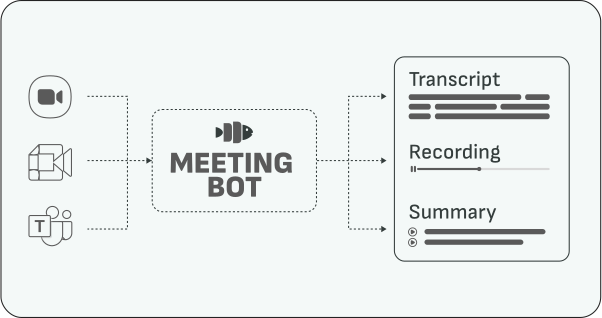
Meeting-BaaS On-Premises Quick Start
Using our pre-built Docker images, you can easily have your own Meeting BaaS infrastructure running. This article shows how's that possible, what you'll need, and most importantly, how much it should cost you.
You'll get full control over your data, complete customization capabilities, and enterprise-grade security while maintaining the same API functionality as the hosted version.
Most importantly, this deployment enables you to pay the real price for meeting bots ($0.066/hour) while having the stability of a maintained commercial product, with a Service Level Agreement.
Build AI meeting assistants, automated transcription workflows, real-time audio streaming, meeting analytics, customer interaction tracking, compliance monitoring, and intelligent meeting summarization with full data sovereignty.
Pricing Evaluation
We estimate the base setup will cost you around $5,500/month total, broken down as follows:
Base Setup Costs:
- Our consulting fee: $10,000/month (includes setup, maintenance, support, and SLA)
- Infrastructure costs: $1,500/month (includes 8 bots running at all times)
Example: 20,000 hours per month
- Base setup: $5,500/month (includes 1,408 hours - 8 hours/day × 8 bots × 22 working days)
- Additional hours: 18,592 hours × $0.066 = $1,227
- Total: $6,727/month ($0.336/hour)
Cost efficiency improves with scale:
- 50,000 hours/month: ~$8,700/month ($0.174/hour)
- 100,000 hours/month: ~$12,100/month ($0.121/hour)
Prerequisites
- Kubernetes cluster (1.20+)
- A PostgreSQL database
- A Redis instance
- S3-compatible storage
- A SQS queue
- kubectl configured
- Docker/container runtime
- 16GB+ RAM, 8+ vCPUs minimum
- Outbound internet access for meeting platforms
How does it work?
Our on-premises deployment uses enterprise-grade CI/CD automation to keep your infrastructure synchronized with our latest improvements.
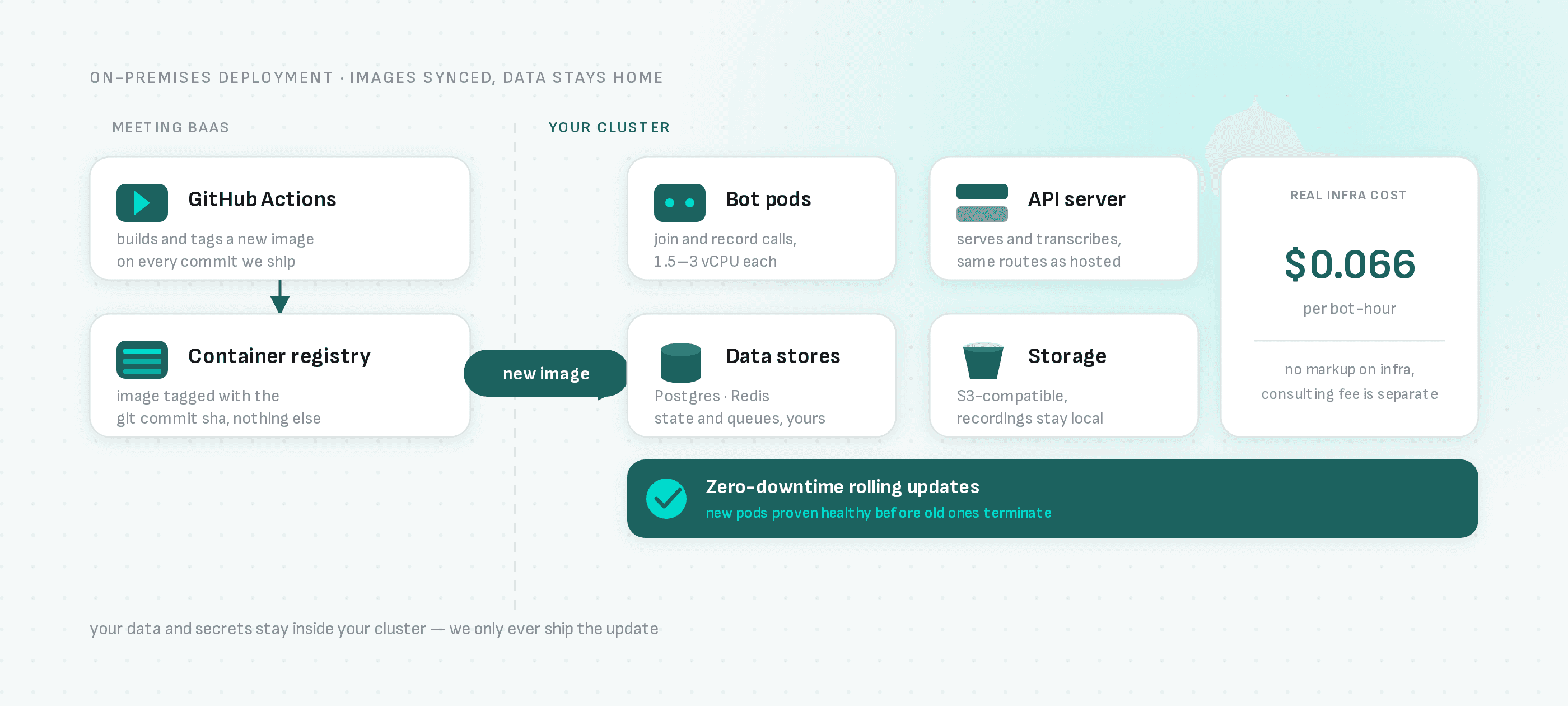
Image Builds Through CI/CD, Deploys on Your Command
How it works:
- GitHub Integration: Our CI/CD pipeline automatically builds and pushes new Docker images when we update our codebase
- You Control the Rollout: Kubernetes doesn't watch a registry and auto-deploy on its own — a new image sitting in our registry doesn't touch your cluster until you tell it to. Run our
baas_controller.sh upgradecommand (or wire your own image-watcher, e.g. Flux or ArgoCD Image Updater, if you want it automatic) to pick up a new tag.
How the Update Process Works:
-
Code Changes: Our GitHub Actions workflow automatically builds new Docker images with git commit hashes and pushes them to our Scaleway Container Registry
-
You Trigger the Deploy: Run the upgrade command against the new image tag whenever you're ready — this isn't automatic unless you set up your own registry-watching controller
-
Zero-Downtime Deployment: Once triggered, Kubernetes replaces pods one by one, ensuring new pods are healthy before terminating old ones
Key Benefits:
- ✅ You Decide When: Pull in features, fixes, and security patches on your own schedule, not ours
- ✅ Zero Downtime: Seamless rolling updates without service interruption once triggered
- ✅ Version Tracking: Complete audit trails with git commit hashes
- ✅ Enterprise Reliability: Same CI/CD pipeline as our production environment
You get full control over your infrastructure, pulling in our latest improvements whenever you run the upgrade command.
Quick Setup
1. Clone Kubernetes Config
git clone https://github.com/Meeting-BaaS/kubernetes-config.git
cd kubernetes-config
2. Install BaaS CLI
./baas_controller.sh install3. Set Environment
export ENVIRON=prod # or preprod for staging4. Deploy Services
# Deploy bots (uses pre-built Docker images)
ENVIRON=prod ./baas_controller.sh bots install

# Check status
ENVIRON=prod ./baas_controller.sh bots status

# View logs
ENVIRON=prod ./baas_controller.sh bots log -f
Core Commands
Bot Management
# Install bots
ENVIRON=prod ./baas_controller.sh bots install

# Upgrade bots (zero downtime)
ENVIRON=prod ./baas_controller.sh bots upgrade

# Check status
ENVIRON=prod ./baas_controller.sh bots status

# View logs
ENVIRON=prod ./baas_controller.sh bots log -f

# Uninstall (causes downtime)
ENVIRON=prod ./baas_controller.sh bots uninstall
API Server Management
# Install API server
ENVIRON=prod ./baas_controller.sh api install

# Upgrade API server
ENVIRON=prod ./baas_controller.sh api upgrade

# Check status
ENVIRON=prod ./baas_controller.sh api status

# View logs
ENVIRON=prod ./baas_controller.sh api log -f
Cluster Management
# Install cluster
ENVIRON=prod ./baas_controller.sh cluster install

# Access metrics
ENVIRON=prod ./baas_controller.sh cluster metrics
Resource Requirements
Per Bot Pod
- CPU: 1.5 vCPU (requests) / 3 vCPU (limits)
- Memory: 3GB RAM (requests) / 6GB RAM (limits)
- Storage: 20GB for recordings
Infrastructure Minimum
- Control Plane: 2 vCPU, 4GB RAM
- Worker Nodes: 16 vCPU, 32GB RAM (supports ~8 bots)
- Database: 8 vCPU, 32GB RAM (PostgreSQL)
- Cache: 2 vCPU, 4GB RAM (Redis)
Environment Variables
# Required
export ENVIRON=prod
export KUBECONFIG=/path/to/kubeconfig

# Optional
export SKIP_VALIDATION=1  # Skip confirmations
Zero-Downtime Updates
# Always use upgrade, never install for running services
ENVIRON=prod ./baas_controller.sh bots upgrade
ENVIRON=prod ./baas_controller.sh api upgrade
Troubleshooting
# Check pod status
kubectl get pods -n services

# Describe pod issues
kubectl describe pod <pod-name> -n services

# Check persistent volumes
kubectl get pvc -n services

# Test connectivity
kubectl exec -it <pod-name> -n services -- curl -I https://meet.google.com
API Integration
# Set API endpoint
export MEETING_BAAS_API=https://your-domain.com/api
export API_KEY=your-api-key

# Test connection
curl -H "Authorization: Bearer $API_KEY" $MEETING_BAAS_API/version
Storage Configuration
Persistent Volumes
apiVersion: v1
kind: PersistentVolumeClaim
metadata:
  name: bot-storage
spec:
  accessModes:
    - ReadWriteOnce
  resources:
    requests:
      storage: 20Gi
  storageClassName: sbs-15k  # High IOPS
Storage Classes
sbs-15k: High IOPS for recordingssbs-default: General purposescw-bssd: NVMe for high performance
Monitoring
# Access Grafana (if deployed)
ENVIRON=prod ./baas_controller.sh cluster metrics

# Check resource usage
kubectl top pods -n services
kubectl top nodes
Scaling
# Scale bots horizontally
kubectl scale deployment meeting-bots --replicas=10 -n services

# Auto-scaling (HPA)
kubectl get hpa -n services
Security
Network Policies
apiVersion: networking.k8s.io/v1
kind: NetworkPolicy
metadata:
  name: bot-network-policy
spec:
  podSelector:
    matchLabels:
      app: meeting-bots
  policyTypes:
    - Ingress
    - Egress
  egress:
    - to:
        - namespaceSelector: {}
      ports:
        - protocol: TCP
          port: 443
RBAC
apiVersion: rbac.authorization.k8s.io/v1
kind: Role
metadata:
  namespace: services
  name: bot-role
rules:
  - apiGroups: [""]
    resources: ["pods", "services"]
    verbs: ["get", "list", "watch"]
Backup & Recovery
# Database backup
kubectl exec -it postgres-pod -n services -- pg_dump meeting_baas > backup.sql

# Restore database
kubectl exec -i postgres-pod -n services -- psql meeting_baas < backup.sql
Cleanup
# Remove all services
ENVIRON=prod ./baas_controller.sh bots uninstall
ENVIRON=prod ./baas_controller.sh api uninstall

# Remove cluster (destructive)
ENVIRON=prod ./baas_controller.sh cluster uninstall